仕組み · a mechanism that works

Label an issue.
Get a pull request.

Shikumi is an open-source software factory you run yourself. Sandboxed AI coding agents analyse, design, plan and build your GitHub issues, then open the pull requests. You stay in the loop and review every PR.

curl -fsSL https://github.com/theninjadojo/software-factory/releases/latest/download/install.sh | bash
Starts in dry-run: nothing touches GitHub until you press Go live.
StartIssue
AgentAnalyse
AgentDesign
AgentBuild
YouReview & merge
Three minutes

See a ticket go through the line

From a labelled issue to a reviewed pull request: the stages, the questions it asks you, the sandbox, the tests and the screens.

  Shikumi demo · 3:22

Music: “Aeon” by Theatre Of Delays, from Bensound (licence code GMFQWILTYDKRSDGP); “Blue Hill Valley” by Iros Young on Uppbeat (licence code BREVUEBWJMZP6RLF). Voices: ElevenLabs. The music and voices are used under their own licences, not the MIT licence.

How it works

A production line for your backlog

Put a label on an issue. A team of specialist agents picks it up, each one handing a document to the next, until a pull request lands in front of you.

🔎

Analyst

Writes requirements, acceptance criteria and the open questions, right on the ticket.

🎨

Designer

Plans flows, states and copy. With Claude Design canvases it even opens a draft PR of mockups.

📐

Architect

Lays out the data model, API and the order to change repos in, before a line is written.

🔧

Builder

Edits your repos and opens one cross-linked PR per repo. All or nothing: if one patch is rejected, none are pushed.

👀

Reviewer

A second agent, ideally from a different model family, reads the PRs and posts a structured review. It never approves or merges.

🚦

CI watcher

Watches your own CI, reports pass or fail, and can give the agent a fix round with the failing logs.

Not sure which stage a ticket needs? Add factory:auto and a classifier picks the next stage, skips the ones it can, and only stops to ask you when a person is genuinely needed.

See it work

Watch the factory floor

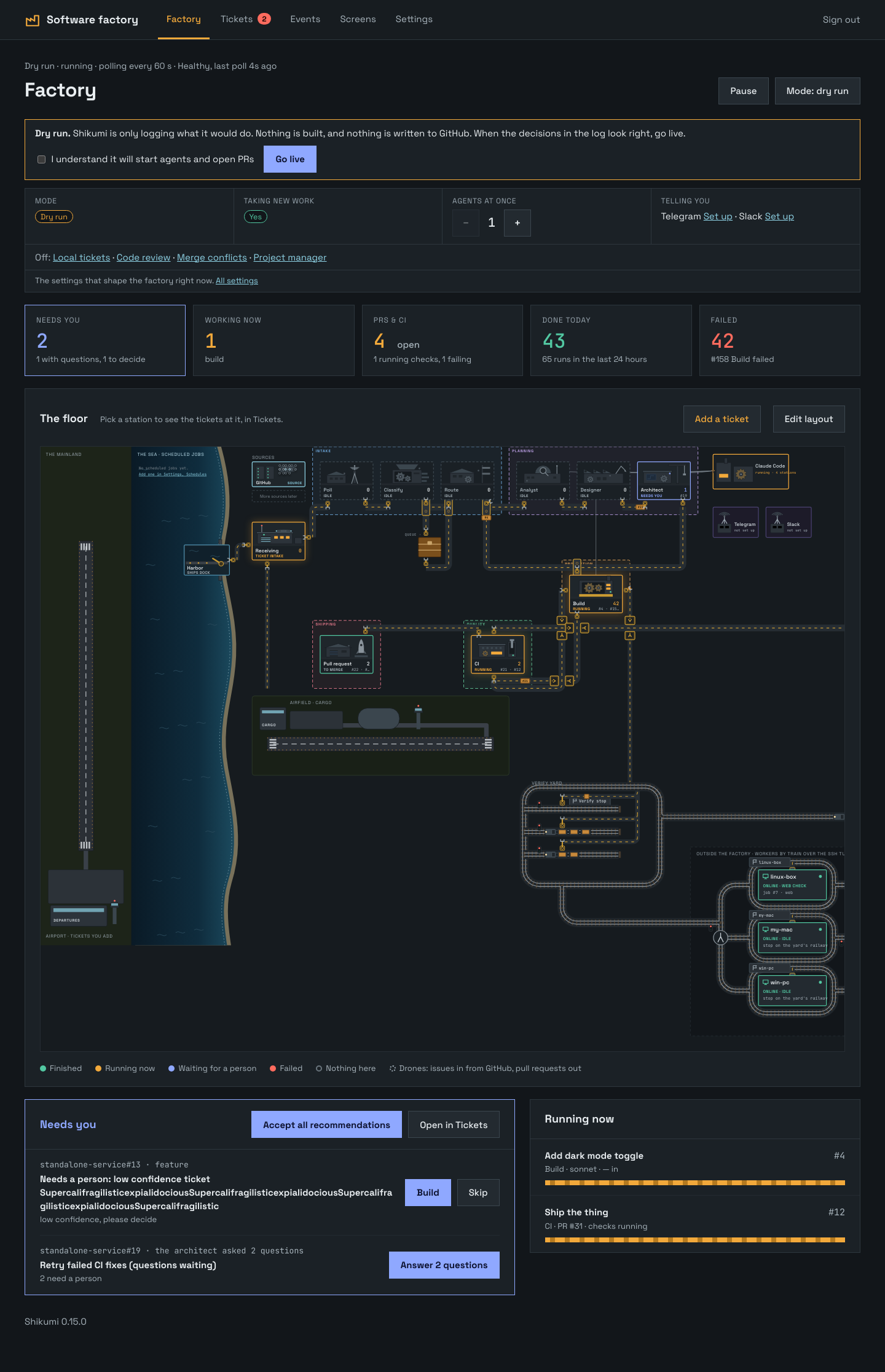
Every ticket is a small drone travelling along the belts from intake to a pull request. See what is running, what is waiting for you and what failed, at a glance. You can even redraw the floor.

  127.0.0.1:8787 · Factory
The Shikumi admin UI: a top-down factory floor with stations for intake, analyst, designer, architect, build, CI and pull requests, linked by belts and rails.
FinishedRunning nowWaiting for a personFailed
💬

Telegram or Slack

Alerts, Run and Skip buttons, answers to the agent's questions, and /status /pause /resume. Only your id is obeyed.

🧱

Multi-repo projects

Web, mobile and shared packages are one workspace. One ticket can change them all.

🖥️

Verification workers

Optionally build and test a patch on a Mac or any machine you own before it is pushed.

More than a pipeline

What else is on the line

All optional, all off until you turn them on in Settings.

🧪

Tests and screens

A register of test scenarios per repo, with pass and fail history. A Screens board shows every page as designed and as built, and you can mark one up and turn the notes into a ticket.

🔀

Merge conflicts

Spots a factory PR that conflicts with its base, merges the base in, and lets an agent resolve only the conflicted files. Never a rebase or a force-push.

📋

Project manager

Ranks each repo's factory tickets by priority and holds a build until the tickets it depends on are closed. Your own priority labels always win.

📦

Packages first

When a change touches a shared package and the apps that use it, the package PR goes first. The apps are built once it is merged and published.

🗂️

Local tickets

Keep tickets in the factory itself instead of GitHub issues, or import an issue into it. Scheduled jobs and code-smell scans can file tickets on a timer.

🌱

New projects

Describe what you want to build. An interviewer agent asks a few rounds of questions, then recommends a stack, patterns and tests from a fixed catalogue.

Built to be trusted
We assume the agent will be prompt-injected by something it reads. So we made that not matter.
  • No network. The sandbox can only reach the model API, through a proxy.
  • No credentials. Tokens never enter the sandbox.
  • No way out. Read-only root, no capabilities, no path to the host.
  • No direct writes. Agents only produce data. The orchestrator validates it before it touches GitHub.
Sandboxuntrusted · no network · no secrets
↓ a patch or a document (data)
Orchestratorvalidates · applies to pristine clones
↓ factory/* branches only
Pull requesta person reviews and merges
Getting started

From zero to a reviewed PR

About fifteen minutes once you have these. Setup asks for each one and checks it before going on.

Install it

One command creates a shikumi folder, downloads the latest release and pulls the prebuilt images. Then a guided setup:

  1. asks which repos to work on, and writes the config;
  2. takes the GitHub token, and checks it can write to each repo;
  3. takes your Claude credentials, and checks an API key works;
  4. asks you to choose a password for the web UI;
  5. asks whether you open the UI on this machine only, or from your network;
  6. creates the labels in your repos, starts everything in dry-run and runs a health check.
curl -fsSL https://github.com/theninjadojo/software-factory/releases/latest/download/install.sh | bash

Rather build it yourself? git clone the repo and run ./scripts/setup.sh. There is also a hardened native install on rootless Podman: see Operations.

Open the UI

The setup prints a URL, usually http://127.0.0.1:8787. Sign in with the password you chose. It starts in dry-run: the factory logs what it would do and writes nothing to GitHub.

On another computer? Tunnel to it: ssh -L 8787:127.0.0.1:8787 your-host, then open http://127.0.0.1:8787.

Label a small issue

Pick something low-risk, like “Add a Contact link to the footer”, and label it. Start with factory:analyze to see the first agent at work.

factory:analyzeRequirements and questions
factory:designUX design and mockups
factory:architectTechnical plan
factory:readyBuild it, open the PR
factory:autoLet the factory pick the stages
factory:reviewA code review on the ticket's PRs
factory:fix-conflictsResolve merge conflicts in its PRs
factory:unblockedIgnore the project manager's blockers

Labels only count when someone with write access to the repo applies them.

Go live and review

When the decisions in the log look right, press Go live. Agents open pull requests, your CI runs, and you merge what you like. Protect main with required reviews: that is the real control.

Read the full walkthrough →

Keep it up to date

The UI shows a banner when a new release is out. Update from the shikumi folder; it will not restart over a running agent, and rolls back if the new version does not start.

./scripts/update.sh   # or a version: ./scripts/update.sh v0.39.0

Stuck? Troubleshooting covers the install, the token, the UI and a first ticket that does nothing. Start with the health check:

docker compose run --rm -e FACTORY_CONFIG=/etc/factory/config.toml orchestrator python3 -m factory.ctl doctor
Tours · under three minutes each

See every part of the factory at work

Seven short walkthroughs of the admin UI: setting it up and tuning the agents, tests and screens, planning the delivery, the machines it runs on, shipping across repos, where work comes from, and the floor itself.

Set it up once. Tune it as you learn.

Credentials and projects, then the stage agents, the classifier and its confidence threshold, the model for each ticket size, and the sandbox limits.

  Setup tour · 2:43
CredentialsProjectsDry runStage agentsClassifierConfidence thresholdModels by ticket sizeAgent instructionsSandbox & limitsCode review & CIGo live

Tests and screens, before you merge

The Tests register and its runs on your own worker, failures first, then the Screens board: every page at every size, as designed beside as built, and baselines that guard a page on every build.

  Tests & screens · 2:13
Tests registerRun a feature's testsScenario historyFailures firstBuild screensCanvasJourneysReview notes → ticketBaselines

Plan the delivery with it

Tickets as a list or a board, local tickets, pinned priorities and the project manager that ranks the rest and records blockers, then the roadmap's milestones and steps, splitting a large ticket, the ticket review, schedules and ticket chat.

Tickets & boardLocal ticketsPinned prioritiesProject managerBlockersRoadmapMilestonesSplit a ticketTicket reviewSchedulesChat

Your machines, kept running

Verification workers that build and test every patch before it is pushed, the Server page and watchdog, backup and restore, updates that roll back, and other models through harnesses.

Verification workersiOS & AndroidFix roundsAdd a workerServer pageWatchdogBackup & restoreUpdatesHarnessesPlan usage

Shipping safely across repos

Release waves that ship the package before the apps that use it, merge conflicts resolved without a force-push, mockup gates before a build, and pull requests with their checks.

Build orderRelease wavesLockfile refreshMerge conflictsMockup gatesPRs & CISub-issues

Work arriving from more places

Comment triage on tickets the factory worked on, Claude Design links, code-smell scans that open tickets, interviews for a new project, and Telegram and Slack.

Comment triageDesign linksCode-smell scansCustom smellsNew project interviewsTelegramSlack

Make the floor yours

The live floor: tickets by plane, ship and drone, power stations and the Verify yard, time and weather, a failed station's call-out, and the layout editor.

The live floorTime & weatherCall-outsFloor editorBeltsTownDashboard tiles
Music: “Aeon” by Theatre Of Delays, from Bensound (licence code GMFQWILTYDKRSDGP); “Blue Hill Valley” by Iros Young on Uppbeat (licence code BREVUEBWJMZP6RLF). Voices: ElevenLabs. The music and voices are used under their own licences, not the MIT licence.

Straight talk

Honest about what it is

Shikumi is a working prototype, run for real on one multi-repo project. Know the edges before you point it at anything you care about.

Agents reason, they don't run

The sandbox has no network, so agents can't install dependencies or run tests. Your CI is the real check, or add a verification worker.

Review every PR

A hijacked agent can still write bad code. The factory only pushes factory/* branches, but you decide what merges.

Use an API key

It is the supported route for unattended use. Subscription tokens work, but their terms are a gray area, so decide for yourself.

One run at a time

By default the factory works on one ticket at a time. Raise max_parallel if your plan allows more.

An alpha classifier

The optional classifier behind factory:auto uses an alpha API. On any error it falls back to your labels.

Open source, MIT

Self-hosted, no account with us, no telemetry. Read all of it, change all of it.

Ready to start the line?

Install it, label one issue, and see what comes out the other end.